Pumply - Pumplog Tracker
- 4.7
- Rating
- 50.00K
- Installs
- Free
- Price
 Analysis by App-foxy
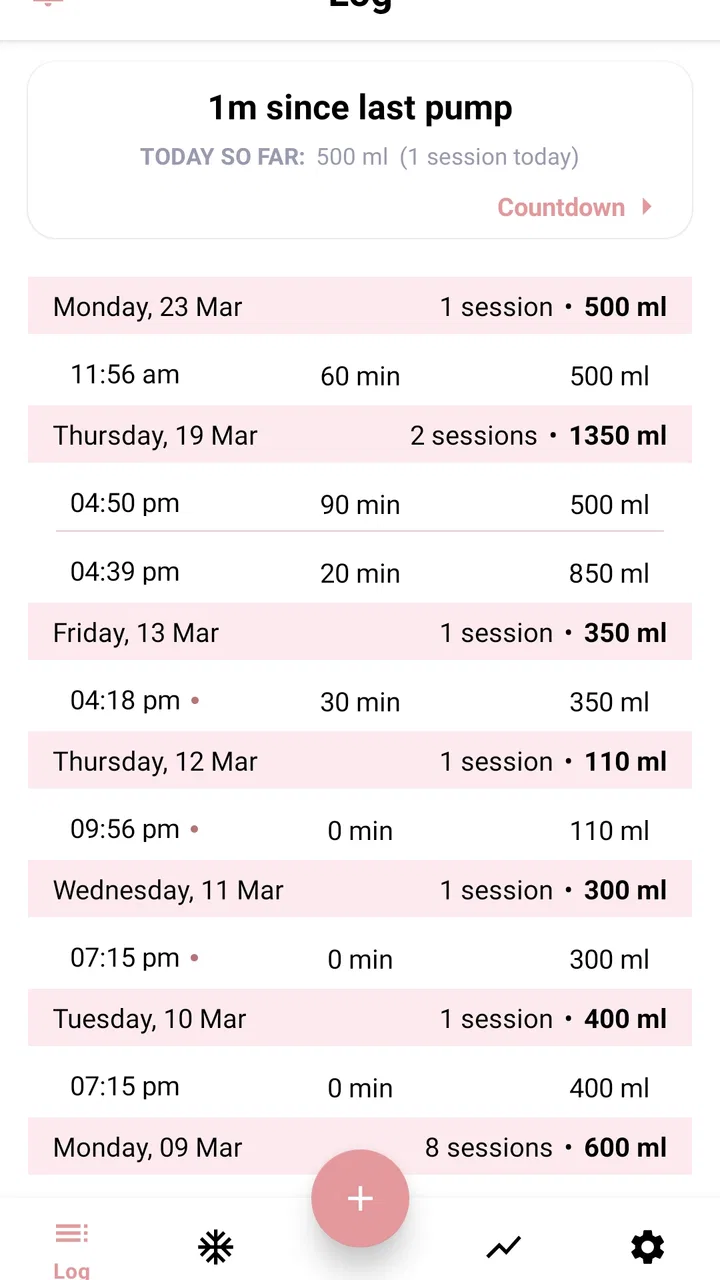
When I first tried Pumply - Pumplog Tracker, I understood its appeal almost immediately: it is built for the very specific routine of exclusive pumping, where remembering each session can become surprisingly difficult. Instead of relying on memory, a notes app, or scraps of paper beside the pump, I could use one focused place to record sessions, volumes, and running totals. That narrow purpose is also its biggest strength. This is not a general baby diary pretending to be a pumping tool; it is a parenting app designed around the repeated details that matter during a demanding stage.
In my experience, the best tracking apps are not the ones with the longest feature lists. They are the ones I can open while tired, enter the important information quickly, and close without turning a simple task into another project. Pumply follows that practical idea. Northlight Studio has kept the concept centered on pumping rather than surrounding it with unrelated childcare features. If you are deciding whether it belongs in your daily routine, the useful question is not whether it can record everything about family life. The question is whether a dedicated pumping log is more helpful to you than your current workaround.
How Pumply fits into a real household routine
I’d treat Pumply as a quiet support for the moments between sessions, not as a household command center. A simple handoff habit—telling the next caregiver what matters, then checking the log together when convenient—can keep the record useful without making anyone feel monitored. That routine works best when the pumping parent decides what gets shared and the household agrees on one dependable place for entries.
You May Also Like

 Blood Strike: 2.5 Anniversary
Blood Strike’s Loadouts Turn Every Drop Into a Tactical Gamble
A close look at Blood Strike’s custom loadouts: how fast access to signature weapons reshapes its battle royale rhythm, rewards preparation, and narrows the gap between fights.

 Pandora - Music & Podcasts
Pandora’s Music Is Easy to Start, but Harder to Recover
Pandora’s strength is its low-effort path from a seed to a station. Its weak spot is how much confidence it asks you to place in connection, setup, and quiet recovery.

 8 Ball Pool
 Is Built on Rivalries, Rematches, and Routine
A close look at the rivalries, rematches, shared routines, and unanswered safety questions that turn a quick pool match into a persistent mobile community.

 Samsung Music
’s Quiet Strength Is Playing What You Already Own
Its reach comes less from spectacle than from dependable access to a personal library. That simplicity is both the app’s strongest retention engine and its ceiling.

 AccuWeather: Weather Radar
AccuWeather Review: A Quick, Clear Forecast for Everyday Decisions
For everyday plans, the best forecast is the one you can understand quickly. AccuWeather makes rain timing, radar, and local conditions easy to act on, with a few trade-offs.

 Hill Climb Racing
Why Hill Climb Racing Still Turns Crashes Into One More Run
A tiny car, a bumpy hill and one more upgrade: Hill Climb Racing keeps resurfacing because its simple chaos makes every near-miss feel personal.
More From Our News Desk



A shared-device scenario without confusing personal records
Imagine a household where one parent pumps during the night, another parent helps prepare bottles, and both people need a reliable idea of what has already happened. A paper log on the kitchen counter may be visible, but it can be smudged, misplaced, or filled in later from memory. A general notes app is easy to access, yet its entries can become a long, unstructured stream. Pumply makes more sense when the goal is to keep pumping information together in one dedicated place.
I would use it after each session rather than waiting until the end of the day. That small habit matters because delayed logging creates the exact uncertainty the app is meant to solve: Was that session before breakfast or after it? Was the amount written down correctly? Did I already add the evening entry? Recording close to the event keeps the log more trustworthy and makes the totals more useful.
For a shared household, the important boundary is that the app should be treated as a record for the person who is pumping, not as a general family dashboard. The other parent can help interpret the information or use it during a handoff, but I would not assume that one installation automatically creates separate profiles, shared access, or synchronized records between devices. If two adults need to enter information from different phones, they should first agree on one clear routine rather than casually duplicating entries.
That distinction is easy to overlook. A tracking app can improve coordination only when everyone knows which record is the authoritative one. If one person logs on a phone and another keeps a parallel paper list, disagreements can appear even when both are trying to help. My practical recommendation is to choose one primary device, keep it available near the usual pumping area, and use verbal handoffs for anything urgent that has not yet been entered.
Setup should be simple, but expectations should stay realistic
Pumply is free to install, which lowers the barrier for someone who wants to test a dedicated log before committing to a new routine. The app is rated for Everyone, and it runs on Android devices using 8.0 or later. Those details make it approachable for many households, including one where an older spare phone is being used as a practical bedside or nursery device.
Still, a free installation does not mean every household need is covered without limits. The app includes in-app purchases ranging from $5.99 to $24.99 per item. I would look at the available options before building my entire routine around the app, especially if I expect advanced convenience or long-term use. The sensible approach is to start with the basic workflow, decide whether logging feels natural, and only then consider whether an optional purchase offers enough value for this particular stage.
There is also a difference between setting up the app and setting up a reliable system around it. I would choose a consistent place for the phone, decide whether volumes are entered immediately or after each side is complete, and agree on how a partner should read the record. These decisions are not glamorous, but they prevent the most common household problem: the app contains information, yet nobody knows how to use it consistently.
One useful technique is to keep the tracking routine deliberately smaller than the pumping routine itself. If I am exhausted, I should record the essential session details first rather than trying to reconstruct a perfect journal. A detailed note that arrives hours late may be less valuable than a brief, timely entry. Pumply works best when it supports that low-friction behavior instead of becoming another task that needs careful administration.
Coordination is where a focused log earns its place
The app’s central value is not simply that it stores numbers. It gives those numbers a place in the daily conversation between caregivers. If one parent is leaving for work, the other can use the recent record to understand the pattern of sessions and what still needs attention. If a relative is helping for a few hours, a dedicated log is easier to explain than a scattered collection of messages.
I would be careful, however, not to treat the recorded total as a complete picture of feeding or health. Pumping output can vary for many ordinary reasons, and an app cannot interpret the meaning of every change. Its role is organizational: it helps me remember what happened. It should not replace professional advice or become a source of pressure when a session looks different from the previous one.
A particularly useful workflow is to review the log at a calm moment rather than during every rushed handoff. For example, I might check the day’s entries before going to bed, confirm that no session was accidentally omitted, and then leave the phone ready for the next use. This turns the app into a lightweight record instead of a constant source of monitoring. The benefit is clearer communication without making every household interaction revolve around tracking.
Another practical trade-off concerns precision. If the app allows me to enter volumes, I should use the same measurement habit each time. Switching casually between approximate and carefully measured amounts makes totals harder to compare. I would also avoid “correcting” an old entry from memory unless I am confident about what changed. A transparent, consistently maintained record is more useful than a supposedly exact history assembled from guesses.
Age, trust, and who should actually use the record
The Everyone content rating describes the app’s general age suitability, but the real context is adult caregiving. I would not hand the phone to a child and assume the rating explains the purpose of the app. The information being recorded is personal parenting data, and the person who pumps should decide who can view or discuss it.
This matters in a shared-device home. A phone left on a counter may be used by several people, so I would consider the device’s ordinary privacy habits before entering sensitive details. Pumply can organize the record, but it should not be treated as a substitute for the phone’s own access protections or for a conversation about boundaries. If a partner is helping, consent and clarity are more important than simply giving that person access to the screen.
Households also differ in how much information they want to share. One family may appreciate a partner checking the latest session, while another may prefer that only the pumping parent reviews the log and communicates selected details. Both approaches can work. The app is most helpful when it supports the household’s chosen boundary rather than silently becoming a shared family record by default.
I also see value in separating coordination from judgment. A partner can ask whether a session was logged or whether practical help is needed without commenting on every volume. That keeps the app in its proper role. Tracking should reduce mental load, not create a new way for family members to scrutinize one another.
Where it compares well with ordinary alternatives
The most obvious alternative is a paper notebook. Paper is dependable, visible, and does not need charging. It can be the better choice for someone who dislikes phones near the pump or wants a record that is easy to hand to another caregiver. Its weakness is that totals and patterns require manual work, and handwriting can become difficult to interpret during a tired night.
A general notes app is more flexible than Pumply, but that flexibility can become clutter. Notes are excellent for unusual observations, reminders, or a broader family journal. They are less satisfying when I need a repeatable pumping log with consistent entries. Pumply’s focused identity gives it an advantage for someone who wants the record to stay about pumping rather than mixing it with shopping lists, appointment notes, and messages.
A spreadsheet offers the most control for a detail-oriented user. I could create columns, formulas, and custom summaries, but I would also have to maintain the structure myself. That is a poor trade for a parent who needs quick entry while sleep-deprived. Pumply is the more approachable option when the main goal is to record sessions and volumes without designing a system from scratch.
Finally, a broad baby-tracking app may appeal to families who want feeding, sleep, diapers, and other routines in one place. That all-in-one approach is better if the household wants a complete child-care timeline. Pumply is the better fit when exclusive pumping is the specific problem and a narrower tool feels easier to use. I would skip it if I already have a trusted tracker that handles pumping well and I strongly prefer keeping every care record together.
Small habits that make the app more useful
My first recommendation is to log at the same point in the session every time. If one entry is made at the start, another at the end, and a third much later, the record becomes harder to interpret. A consistent moment reduces accidental omissions and makes the totals more meaningful.
Second, use the app as a handoff aid, not as the only communication method. If another caregiver is about to take over, say what they need to know directly and use Pumply to confirm the history. This is especially important when a phone is charging, unavailable, or being used for another task.
Third, review the pattern rather than reacting to one isolated number. The value of a log comes from repeated entries over time. A single unusual session may simply be a single unusual session. If I notice a concern, I would use the record to describe what happened clearly to a qualified healthcare professional instead of asking the app to explain it.
Fourth, decide what happens when an entry is missed. I would rather mark the next session accurately and accept a gap than invent a precise-looking number. A record that honestly reflects what I know is safer and more useful than one filled with estimates that could later influence household decisions.
Performance, maturity, and the overall household verdict
Pumply has been available since July 24, 2020, and its current version is 5.6. That gives it a more established feel than a brand-new experiment, while still making it sensible to check that the device meets the minimum operating-system requirement before installing. Its audience is also clear: the app is for parents who want an exclusive-pumping log, not for anyone looking for a universal family organizer.
The reception is encouraging, with a 4.7 average from around 1.7 thousand ratings and more than 50 thousand installs. I would read those figures as evidence that the focused idea connects with a meaningful group of users, not as proof that every pumping routine will fit it perfectly. A high average cannot remove the personal question of whether dedicated tracking reduces stress for you or simply adds another screen to manage.
For my household verdict, I would recommend Pumply to an adult who is exclusively pumping, wants session and volume records in one focused app, and values a simpler alternative to handwritten notes or a self-built spreadsheet. It is particularly useful when two caregivers need a shared understanding of the routine but can agree on one primary record and clear boundaries around access.
I would choose something broader instead if the main need is a complete baby-care timeline, extensive collaboration across several devices, or highly customized reporting. I would also skip it if tracking itself feels emotionally tiring or if a paper notebook is already working perfectly. The app cannot make pumping easy, but it can remove one layer of remembering and explaining.
That is why I see Pumply as a practical companion rather than a complete parenting system. Its value comes from staying close to one demanding task: keeping pumping information organized enough to support everyday decisions and caregiver handoffs. Used with consistent habits, sensible privacy boundaries, and realistic expectations, it is a focused free starting point for parents who want less guesswork in an already busy household.
FAQs for Pumply - Pumplog Tracker
01What is Pumply - Pumplog Tracker used for?
Pumply - Pumplog Tracker is designed to help users record and monitor pumping sessions in an organized way. You can typically log details such as session times, duration, side or breast used, and output, making it easier to identify patterns and maintain a consistent routine. It can be useful for reviewing progress over time, but it should be treated as a tracking tool rather than a replacement for professional medical advice.
02Is Pumply - Pumplog Tracker suitable for breastfeeding and pumping schedules?
The app is mainly intended for people who express breast milk and want a convenient digital record of their routine. It may help you remember when you last pumped, compare sessions, and keep notes about feeding-related details. Every parent’s schedule is different, so the information shown in the app should be used for personal organization and discussion with a healthcare professional when questions about supply, feeding, or infant nutrition arise.
03Does Pumply - Pumplog Tracker require an internet connection?
Basic tracking features may be available without a constant internet connection, which is convenient when you need to record a session quickly while traveling or away from home. However, certain functions, such as account synchronization, backups, updates, advertisements, or connected services, may depend on internet access. Before relying on the app as your only record, check whether your entries are stored locally or synchronized securely.
04Is my pumping information private and secure in Pumply - Pumplog Tracker?
Because pumping logs can contain sensitive personal and health-related information, privacy is an important consideration before downloading the app. Review Pumply’s current privacy policy, permissions, account requirements, and data-sharing practices in the relevant app store. Avoid entering information you do not need, use device security features, and confirm whether your records can be exported, deleted, or protected with an account or passcode.
05Is Pumply - Pumplog Tracker free to download and use?
The app’s availability, pricing, and included features can vary between Android and iOS and may change with future updates. Check the official store listing before installing it to see whether Pumply is free, supported by advertising, or offers optional subscriptions and in-app purchases. Pay particular attention to trial periods and renewal terms, especially if advanced statistics, cloud backup, or additional tracking tools are locked behind a paid plan.
Pros
- Quickly logs sets
- reps
- weight
- and rest times.
- Clean interface makes workout tracking easy between sets.
- Useful history helps monitor strength and training consistency.
- Supports customized exercises for different routines.
- Progress data can motivate users to maintain regular workouts.
Cons
- Some advanced tracking features may require a paid upgrade.
- Manual entry can feel repetitive during fast-paced workouts.
- Exercise database may not cover every specialized movement.
- Limited social features for sharing progress with friends.
- Data backup and syncing options may need closer inspection.

Pumply - Pumplog Tracker
Gallery